FortiGate A/P HA Cluster in OCI Hands-on Lab
Disclaimer
This lab guide is prepared for Fortinet XPERTS Summit KSA '26 session.
Overview
This step-by-step guide describes how to deploy a FortiGate Active/Passive HA cluster on Oracle Cloud Infrastructure using Terraform and OCI Resource Manager Stacks.
The lab protects workloads for north-south, south-north, and east-west traffic using native OCI networking components, including VCNs, subnets, route tables, security lists, and Dynamic Routing Gateway.
Lab Objectives
By the end of this lab, you will be able to:
- Log in to Oracle Cloud Infrastructure.
- Select the correct OCI region.
- Deploy a FortiGate Active/Passive HA cluster.
- Deploy spoke Ubuntu VMs for testing.
- Configure OCI Dynamic Routing Gateway.
- Configure DRG route tables and route distributions.
- Configure FortiGate static routing.
- Configure FortiGate firewall policies.
- Test ingress, egress, and east-west traffic.
- Destroy the lab environment.
Lab Sections
- Section 1: Log in to OCI
- Section 2: Deploy FortiGate Cluster
- Section 3: Deploy Spoke VMs
- Section 4: OCI Advanced Routing
- Section 5: FortiGate Routing and Policy
- Section 6: Testing
- Section 7: Destroy the Lab
- References
Lab Topology
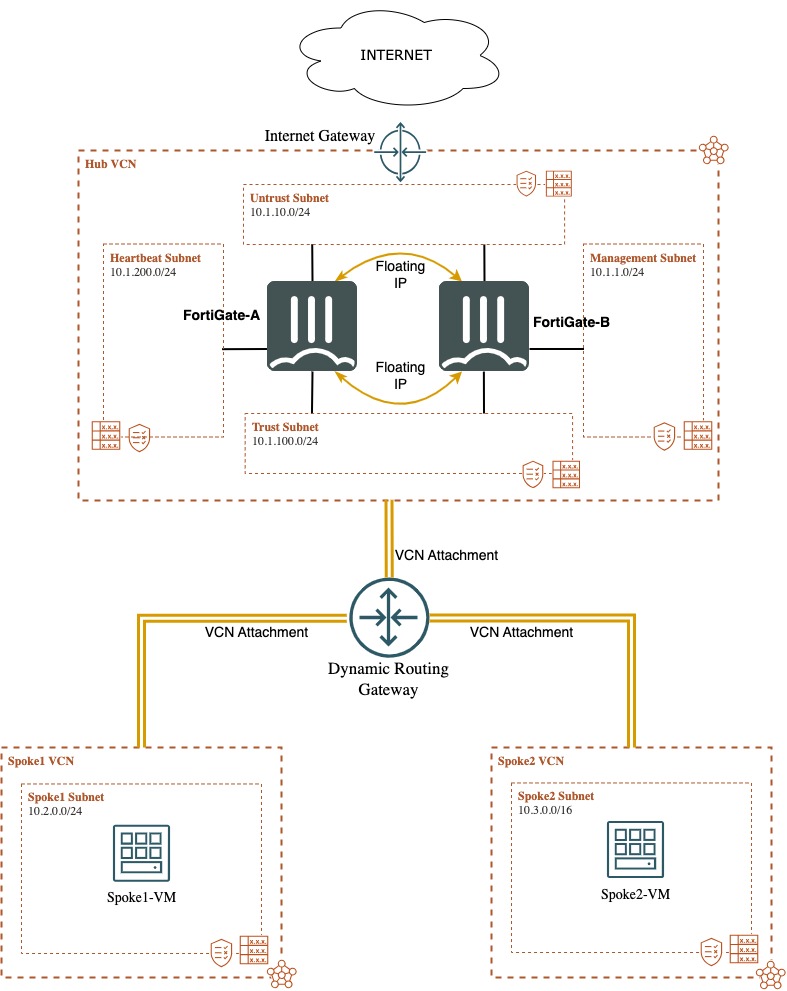
Prerequisites
Before starting, confirm that you have:
- The shared Lab Access Key announced during the lab session
- Your assigned Student ID
Use these details in the protected credential portal to retrieve the lab-specific values below:
| Item | Example / Notes |
|---|---|
| OCI Console URL | https://cloud.oracle.com/ |
| Cloud account name | Displayed in the credential portal |
| Identity domain | Displayed in the credential portal |
| OCI username | Displayed in the credential portal |
| OCI password | Displayed in the credential portal |
| OCI region | Saudi Arabia West Jeddah |
| Student compartment | Displayed in the credential portal |
| Student prefix | Based on your assigned Student ID, for example Student25 |
| Compartment OCID | Displayed in the credential portal |
| FortiFlex token values | Displayed in the credential portal |
Important
Do not share OCI credentials, FortiGate passwords, private keys, compartment OCIDs, or FortiFlex token values with other students.
Naming Convention
Use the following naming convention throughout the lab:
Student<number>